Lot listing section
- Name:
lotListTemplate - Url:
#/lots,#/auctions/{AUCTION_UUID} - Description: Lot listing section including filters and sorting
Preview
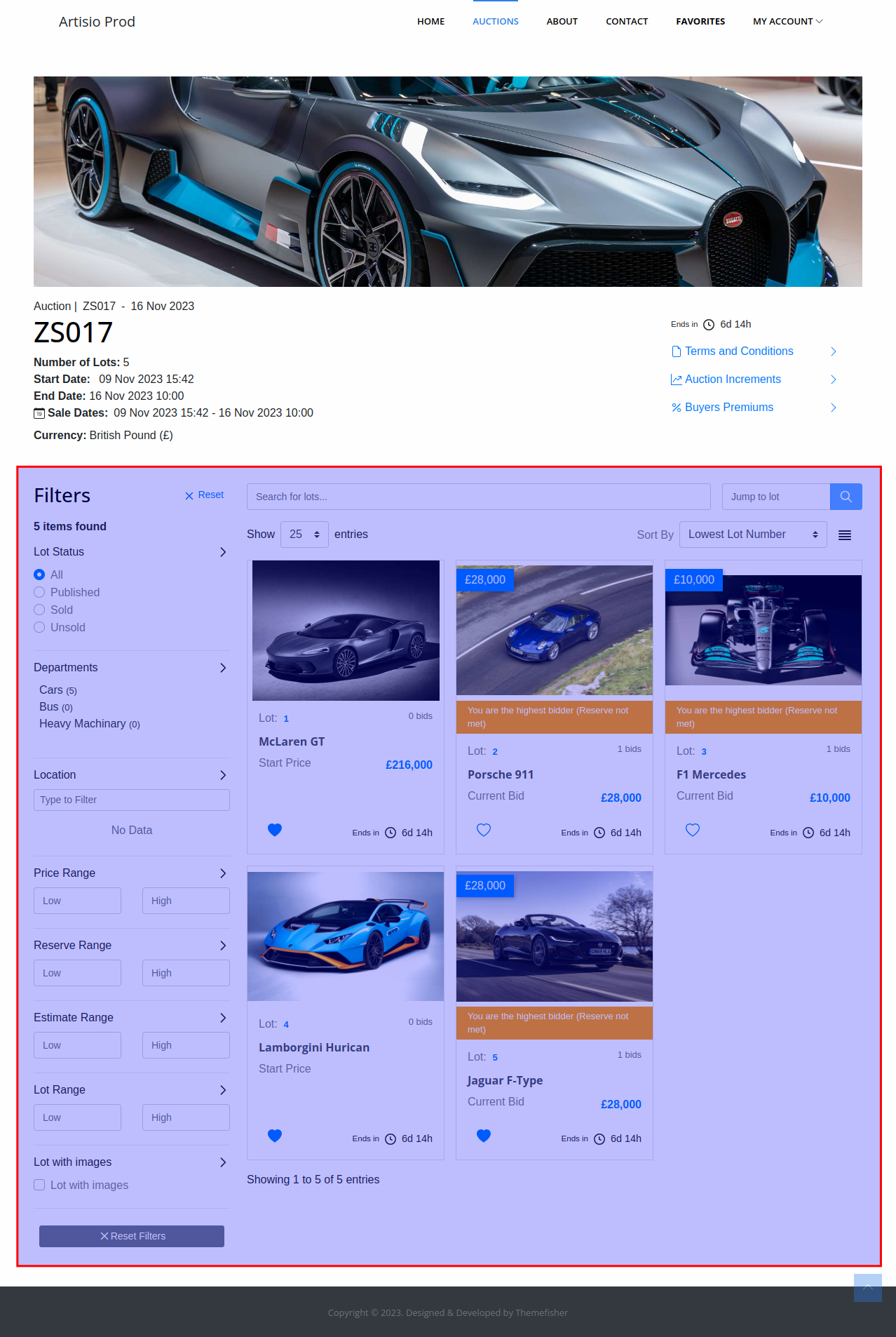
Default Template
<lot-list-and-filters>
  <lot-list-filters />
  <div class="ta-lot-section">
    <div class="ta-lot-list-header-top">
      <lot-keyword-search />
      <jump-to-lot />
    </div>
    <div class="ta-lot-list-header">
      <lot-list-per-page-select />
      <div class="ta-lot-search-wrapper">
        <sorting-dropdown/>
        <lot-list-switch-view/>
        <lot-list-filter-mobile-button/>
      </div>
    </div>
    <lot-list-items />
  </div>
</lot-list-and-filters>
Available Components
<LotListAndFilters />
A layout wrapper providing the sidebar-plus-content structure. The filters sidebar and lot content section must be placed as direct children.
<LotListFilters />
Renders the lot filters sidebar using lotFiltersTemplate. Controlled by enableFilters.
<LotKeywordSearch />
Displays a text input for searching lots by keyword.
<JumpToLot />
Displays an input to jump directly to a specific lot number. Controlled by jumpToLot.
<LotListPerPageSelect />
Displays the per-page dropdown. Controlled by perPageSelect and perPageOptions. Default value is set by lotPaginationLimit.
<SortingDropdown />
Displays the lot sorting dropdown. Controlled by enableSorting.
By default, the dropdown includes built-in lot sorting options and sortable dynamic fields. You can replace the dropdown options with lotSortOptions. Complex options can send multiple ordered sort preferences, for example "live auctions first, then lowest lot number".
Default sort is set by lotDefaultSortField and lotDefaultSortBy. For complex default sorting, lotDefaultSortField can be an array of { key, direction } objects.
<LotListSwitchView />
Displays a toggle button to switch the lot listing between grid and list view.
<LotListFilterMobileButton />
Displays a button to open the filter panel on mobile devices.
<LotListItems />
Renders the list of lots. Each item uses lotListItemTemplate.
<LotListAutoUpdateCheckbox />
Displays a checkbox that, when checked, enables real-time automatic updates of the lot listing (useful on the My Bids page). This component is not included in the default lotListTemplate but can be added.
Properties
mainConfig
See documentation here
is_authorized
See documentation here