Artisio Webapp + Timed Auctions
  • Getting Started
  • Configuration Options
  • My Profile Integration
  • Single Sign On
  • Global Search
  • Template Configuration
  • Auction Details
  • Auction Filters Section
  • Auction List Item
  • Auction Listing page
  • Auction View Page
  • Lot list item template on watchlist
  • Favorite lot listing page
  • Home page
  • Lot list item template on my bids page
  • My bids lot listing page
  • Lot bidding section
  • Lot bidding section for live auctions
  • Lot filtering section
  • Lot list item
  • Lot listing section
  • Lot view page template
  • Update Profile Page
  • Sell an item modal
  • Signup page inputs section
  • Bid Confirmation Popup Template
  • Buy Now Confirmation Popup Template
  • Max Bid Confirmation Modal Template
  • Bid Created Modal Template
  • Lot Purchased Modal Template
  • Max Bid Created Modal Template
Webhooks
Release Notes
  • Getting Started
  • Configuration Options
  • My Profile Integration
  • Single Sign On
  • Global Search
  • Template Configuration
  • Auction Details
  • Auction Filters Section
  • Auction List Item
  • Auction Listing page
  • Auction View Page
  • Lot list item template on watchlist
  • Favorite lot listing page
  • Home page
  • Lot list item template on my bids page
  • My bids lot listing page
  • Lot bidding section
  • Lot bidding section for live auctions
  • Lot filtering section
  • Lot list item
  • Lot listing section
  • Lot view page template
  • Update Profile Page
  • Sell an item modal
  • Signup page inputs section
  • Bid Confirmation Popup Template
  • Buy Now Confirmation Popup Template
  • Max Bid Confirmation Modal Template
  • Bid Created Modal Template
  • Lot Purchased Modal Template
  • Max Bid Created Modal Template
Webhooks
Release Notes
  • Webapp Templates

    • Template Configuration
    • Auction Details
    • Auction Filters Section
    • Auction List Item
    • Auction Listing page
    • Auction View Page
    • Lot list item template on watchlist
    • Favorite lot listing page
    • Home page
      • Preview
      • Default Template
      • Available Components
        • <HomeDepartments />
        • <LotListItems />
        • <FavouriteLotsShortList />
        • <MyBidsShortList />
      • Properties
        • mainConfig
        • is_authorized
    • Lot list item template on my bids page
    • My bids lot listing page
    • Lot bidding section
    • Lot bidding section for live auctions
    • Lot filtering section
    • Lot list item
    • Lot listing section
    • Lot view page template
    • Update Profile Page
    • Sell an item modal
    • Signup page inputs section
    • Bid Confirmation Popup Template
    • Buy Now Confirmation Popup Template
    • Max Bid Confirmation Modal Template
    • Bid Created Modal Template
    • Lot Purchased Modal Template
    • Max Bid Created Modal Template

Home page

  • Name: homePageTemplate
  • Url: #/home
  • Description: Home page template which by default renders all departments and published lots

Preview
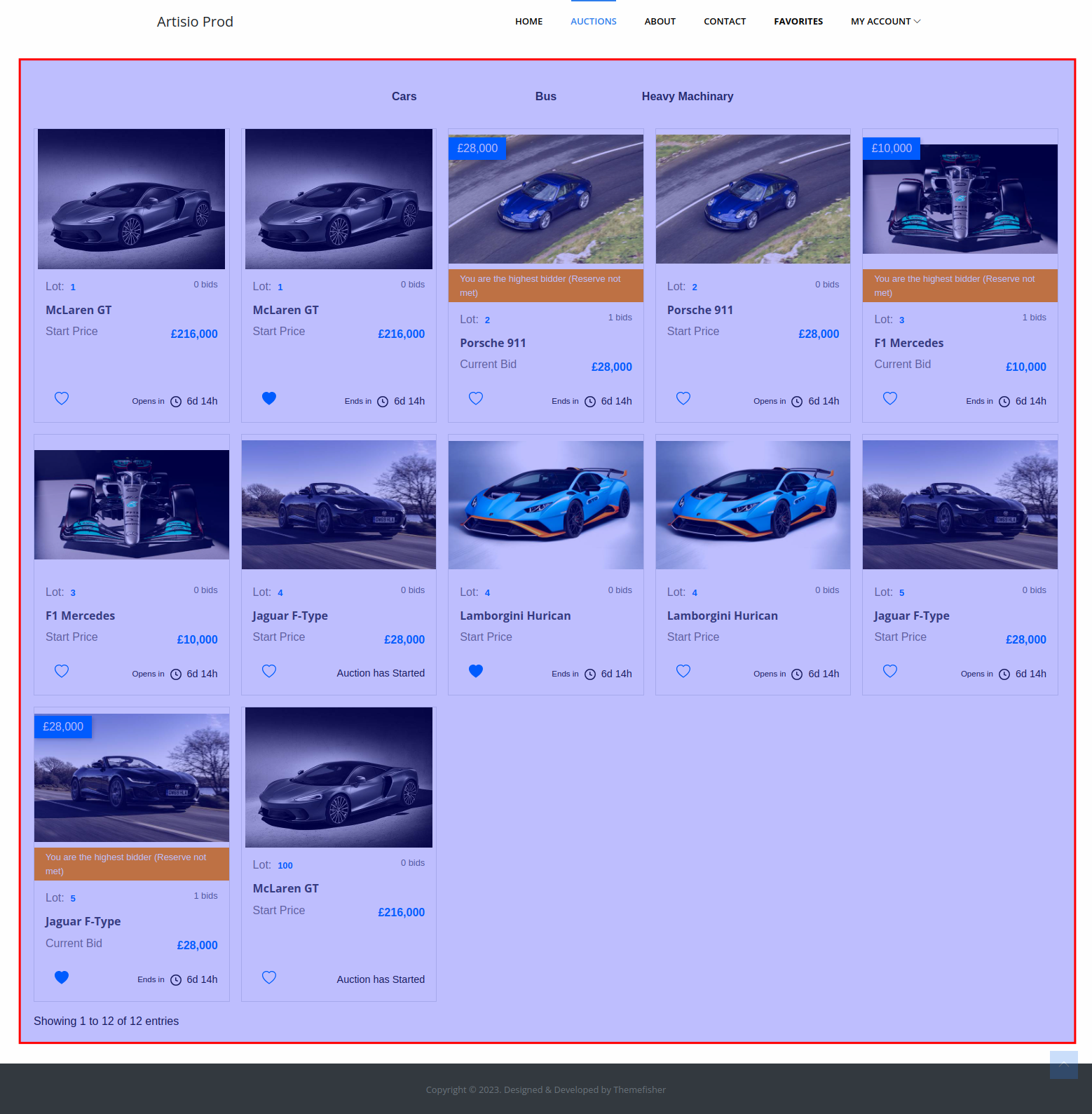
homePageTemplate.png

Default Template

<home-departments />

<lot-list-items />

Department-specific home page

If your webapp uses departments, consider using departmentHomeTemplate instead, which provides a richer experience with department-level search, watchlist, and my bids short lists.

Available Components

<HomeDepartments />

Renders a clickable grid of department cards. Each card shows the department image and name. Clicking a department filters the lot listing below to show only lots from that department.

When alwaysSelectFirstDepartment is true, the first department is automatically selected on page load.

<LotListItems />

Renders the list of lots. Each item uses lotListItemTemplate. On the home page, this typically shows published lots across all departments (or within the selected department).

<FavouriteLotsShortList />

Renders a compact list of the authenticated user's watchlisted lots. Useful to add a quick access panel for watchlisted lots on the home page.

Component props

title
  • Type: string
  • Default: "Watchlist"

The heading displayed above the short watchlist.

<MyBidsShortList />

Renders a compact list of lots on which the authenticated user has placed bids.

Component props

lot-status
  • Type: string
  • Default: "published"

Filter lots by status.

Properties

mainConfig

See documentation here

is_authorized

See documentation here

Last Updated:
Contributors: Zura Sekhniashvili
Prev
Favorite lot listing page
Next
Lot list item template on my bids page