Signup page inputs section
- Name:
signupInputsTemplate - Url:
#/signup - Description: Signup page inputs section template
Preview
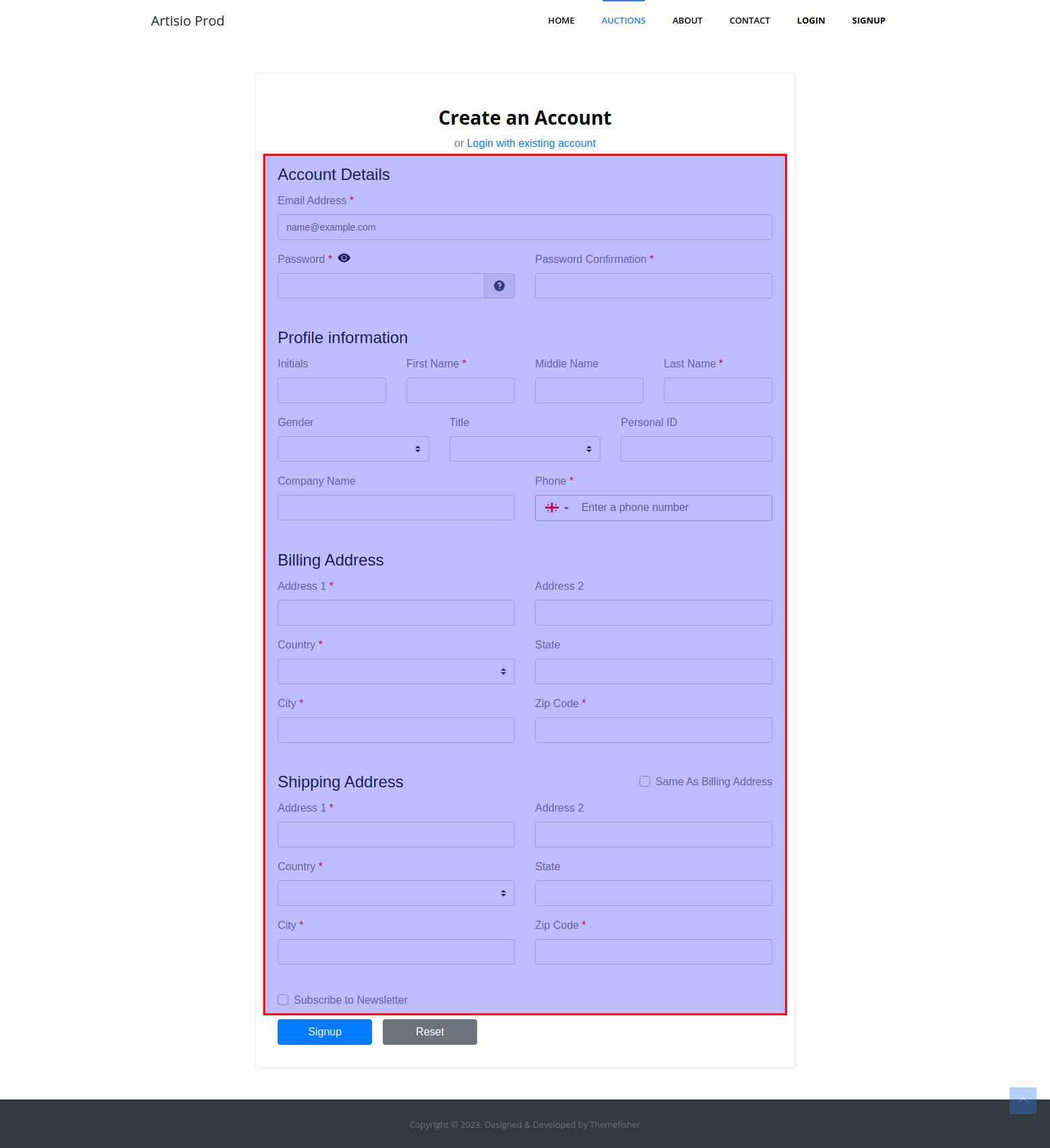
Default Template
<fieldset class="mb-4">
  <legend>{{ $t("Account Details") }}</legend>
  <div class="row">
    <email />
  </div>
  <div class="row">
    <password />
    <password-confirmation />
  </div>
</fieldset>

<fieldset class="mb-4">
  <legend>{{ $t("Profile information") }}</legend>

  <div class="row">
    <initials />
    <first-name />
    <middle-name />
    <last-name />
  </div>

  <div class="row">
    <gender />
    <title-input />
    <personal-id />
    <preferred-language/>
  </div>

  <div class="row">
    <company-name/>
    <phone />
  </div>
</fieldset>

<billing-address-details>
  <legend>{{ $t("Billing Address") }}</legend>

  <div class="row">
    <billing-address1 />
    <billing-address2 />
  </div>
  <div class="row">
    <billing-country />
    <billing-state />
  </div>
  <div class="row">
    <billing-city />
    <billing-zip-code />
  </div>
</billing-address-details>

<shipping-address-details :title="$t('Shipping Address')">

  <div class="row">
    <shipping-address1 />
    <shipping-address2 />
  </div>
  <div class="row">
    <shipping-country />
    <shipping-state />
  </div>
  <div class="row">
    <shipping-city />
    <shipping-zip-code />
  </div>
</shipping-address-details>

<bank-account-details>
  <div class="d-flex justify-content-between align-items-center">
    <legend>{{ $t("Bank Account Details") }}</legend>
  </div>
  <div class="row">
    <bank-account-beneficiary />
    <bank-account-sort-code />
    <bank-account-number />
  </div>
  <div class="row">
    <bank-account-iban />
    <bank-account-swift />
    <bank-account-bank-name />
  </div>
  <div class="row">
    <bank-account-address1 />
    <bank-account-address2 />
    <bank-account-address3 />
  </div>
</bank-account-details>

<personal-identification-details>
  <div class="d-flex justify-content-between align-items-center">
    <legend>{{ $t("Personal Identification Details") }}</legend>
  </div>
  <div class="row">
    <identification-number />
    <identification-type />
  </div>
  <div class="row">
    <place-of-issue />
    <document-issue-date />
  </div>
  <div class="row">
    <document-expiration-date />
  </div>
</personal-identification-details>

<interest-checkboxes />

<customer-terms>
    <div class="row">
        <vat-number />
    </div>
</customer-terms>

<div class="row">
  <subscribe-to-newsletter />
</div>
<div class="row">
  <terms-and-conditions />
</div>
Available Components
Account Details Fields
<Email />
Email address input field. Required for registration.
<Password />
Password input field with validation.
<PasswordConfirmation />
Password confirmation input field. Validates that the value matches the <Password /> field.
Profile Information Fields
<Initials />
Input field for the customer's initials.
<FirstName />
Input field for the customer's first name.
<MiddleName />
Input field for the customer's middle name.
<LastName />
Input field for the customer's last name.
<Gender />
Dropdown for selecting the customer's gender.
<TitleInput />
Dropdown for selecting the customer's title (e.g. Mr., Mrs., Dr.).
<PersonalId />
Input field for the customer's personal ID.
<PreferredLanguage />
Dropdown for selecting the customer's preferred language.
<CompanyName />
Input field for the customer's company name.
<Phone />
Input field for the customer's phone number.
Address Wrapper Components
<BillingAddressDetails />
A conditional wrapper that renders its slot content as the billing address section. The <legend> element should be placed as the first child.
<ShippingAddressDetails />
A conditional wrapper that renders its slot content as the shipping address section.
Component props
title
- Type:
string
The section title displayed in the shipping address fieldset legend.
Billing Address Fields
<BillingAddress1 />— Billing address line 1<BillingAddress2 />— Billing address line 2<BillingCountry />— Billing country dropdown<BillingState />— Billing state/region dropdown (filtered by selected country)<BillingCity />— Billing city input<BillingZipCode />— Billing postal/zip code input
Shipping Address Fields
<ShippingAddress1 />— Shipping address line 1<ShippingAddress2 />— Shipping address line 2<ShippingCountry />— Shipping country dropdown<ShippingState />— Shipping state/region dropdown<ShippingCity />— Shipping city input<ShippingZipCode />— Shipping postal/zip code input
<BankAccountDetails />
A conditional wrapper that renders its slot content as the bank account details section. Only rendered when bankAccountDetails is true.
Bank Account Fields (used inside <BankAccountDetails />)
<BankAccountBeneficiary />— Beneficiary name<BankAccountSortCode />— Sort code<BankAccountNumber />— Account number<BankAccountIban />— IBAN<BankAccountSwift />— SWIFT/BIC code<BankAccountBankName />— Bank name<BankAccountAddress1 />— Bank address line 1<BankAccountAddress2 />— Bank address line 2<BankAccountAddress3 />— Bank address line 3
<PersonalIdentificationDetails />
A conditional wrapper that renders its slot content as the personal identification section. Only rendered when personalIdentificationDetails is true.
Personal Identification Fields (used inside <PersonalIdentificationDetails />)
<IdentificationNumber />— Identification document number<IdentificationType />— Type of identification document (dropdown)<PlaceOfIssue />— Place where the document was issued<DocumentIssueDate />— Issue date of the document<DocumentExpirationDate />— Expiration date of the document
<InterestCheckboxes />
Displays a list of interest checkboxes allowing the user to select their areas of interest. Only rendered when showInterests is true.
<CustomerTerms />
A conditional wrapper for customer terms (VAT) fields. Only rendered when showCustomerTerms is true.
<VatNumber />
Input field for the customer's VAT number (used inside <CustomerTerms />).
<SubscribeToNewsletter />
A checkbox allowing the user to opt in to newsletter communications.
<TermsAndConditions />
Displays the terms and conditions checkbox. Required when termsAndConditionsVersion is configured. The terms content comes from termsAndConditionsUrl or termsAndConditionsHtml.
Properties
mainConfig
See documentation here
is_authorized
See documentation here