Artisio Webapp + Timed Auctions
  • Getting Started
  • Configuration Options
  • My Profile Integration
  • Single Sign On
  • Global Search
  • Template Configuration
  • Auction Details
  • Auction Filters Section
  • Auction List Item
  • Auction Listing page
  • Auction View Page
  • Lot list item template on watchlist
  • Favorite lot listing page
  • Home page
  • Lot list item template on my bids page
  • My bids lot listing page
  • Lot bidding section
  • Lot bidding section for live auctions
  • Lot filtering section
  • Lot list item
  • Lot listing section
  • Lot view page template
  • Update Profile Page
  • Sell an item modal
  • Signup page inputs section
  • Bid Confirmation Popup Template
  • Buy Now Confirmation Popup Template
  • Max Bid Confirmation Modal Template
  • Bid Created Modal Template
  • Lot Purchased Modal Template
  • Max Bid Created Modal Template
Webhooks
Release Notes
  • Getting Started
  • Configuration Options
  • My Profile Integration
  • Single Sign On
  • Global Search
  • Template Configuration
  • Auction Details
  • Auction Filters Section
  • Auction List Item
  • Auction Listing page
  • Auction View Page
  • Lot list item template on watchlist
  • Favorite lot listing page
  • Home page
  • Lot list item template on my bids page
  • My bids lot listing page
  • Lot bidding section
  • Lot bidding section for live auctions
  • Lot filtering section
  • Lot list item
  • Lot listing section
  • Lot view page template
  • Update Profile Page
  • Sell an item modal
  • Signup page inputs section
  • Bid Confirmation Popup Template
  • Buy Now Confirmation Popup Template
  • Max Bid Confirmation Modal Template
  • Bid Created Modal Template
  • Lot Purchased Modal Template
  • Max Bid Created Modal Template
Webhooks
Release Notes
  • Webapp Templates

    • Template Configuration
    • Auction Details
    • Auction Filters Section
    • Auction List Item
    • Auction Listing page
    • Auction View Page
    • Lot list item template on watchlist
    • Favorite lot listing page
    • Home page
    • Lot list item template on my bids page
    • My bids lot listing page
      • Preview
      • Default Template
      • Available Components
        • <LotListAndFilters />
        • <LotListFilters />
        • <LotKeywordSearch />
        • <LotListPerPageSelect />
        • <LotListAutoUpdateCheckbox />
        • <SortingDropdown />
        • <LotListSwitchView />
        • <LotListFilterMobileButton />
        • <IMadeBidLotListItems />
      • Properties
        • mainConfig
        • is_authorized
    • Lot bidding section
    • Lot bidding section for live auctions
    • Lot filtering section
    • Lot list item
    • Lot listing section
    • Lot view page template
    • Update Profile Page
    • Sell an item modal
    • Signup page inputs section
    • Bid Confirmation Popup Template
    • Buy Now Confirmation Popup Template
    • Max Bid Confirmation Modal Template
    • Bid Created Modal Template
    • Lot Purchased Modal Template
    • Max Bid Created Modal Template

My bids lot listing page

  • Name: iMadeBidsLotListTemplate
  • Url: #/my-bids
  • Description: My Bids page template including filters and sorting

Preview
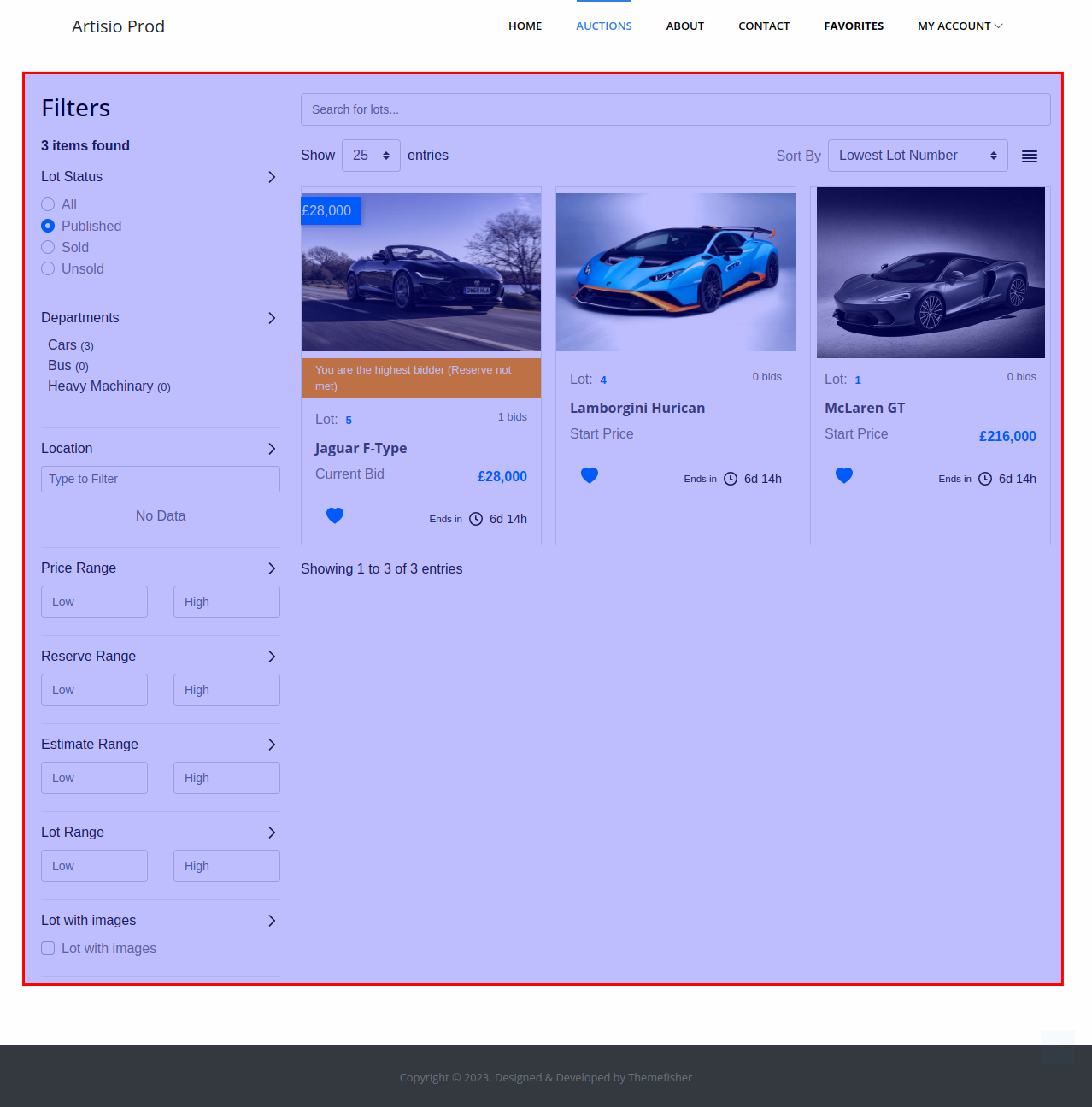
iMadeBidsLotListTemplate.png

Default Template

<lot-list-and-filters>
    <lot-list-filters />
    <div class="ta-lot-section">
        <div class="ta-lot-list-header-top">
            <lot-keyword-search />
        </div>
        <div class="ta-lot-list-header">
            <lot-list-per-page-select />
            <div class="ta-lot-search-wrapper">
                <lot-list-auto-update-checkbox />
                <sorting-dropdown/>
                <lot-list-switch-view/>
                <lot-list-filter-mobile-button/>
            </div>
        </div>
        <i-made-bid-lot-list-items />
    </div>
</lot-list-and-filters>

Available Components

<LotListAndFilters />

A layout wrapper that provides the sidebar-plus-content structure. Filters sidebar and lot section must be direct children.

<LotListFilters />

Renders the lot filters sidebar using lotFiltersTemplate. Controlled by enableFilters.

<LotKeywordSearch />

Displays a text input for filtering lots by keyword.

<LotListPerPageSelect />

Displays the per-page dropdown. Controlled by perPageSelect and perPageOptions.

<LotListAutoUpdateCheckbox />

Displays a checkbox that enables real-time automatic updates of the lot listing. When checked, the lot list refreshes automatically as bid statuses change, keeping the user's bid statuses current.

<SortingDropdown />

Displays the sorting dropdown. Controlled by enableSorting.

<LotListSwitchView />

Displays a toggle button to switch between grid and list view.

<LotListFilterMobileButton />

Displays a button to open the filter panel on mobile devices.

<IMadeBidLotListItems />

Renders the list of lots on which the current user has placed bids. Each item uses iMadeBidLotListItemTemplate.

Properties

mainConfig

See documentation here

is_authorized

See documentation here

Last Updated:
Contributors: Zura Sekhniashvili
Prev
Lot list item template on my bids page
Next
Lot bidding section