Max Bid Created Modal Template
- Name:
maxBidCreatedModalTemplate - Url:
#/lots/[LOT_UUID] - Description: Modal which is displayed when you place a max bid and you set bidAcceptedNotificationType
Preview
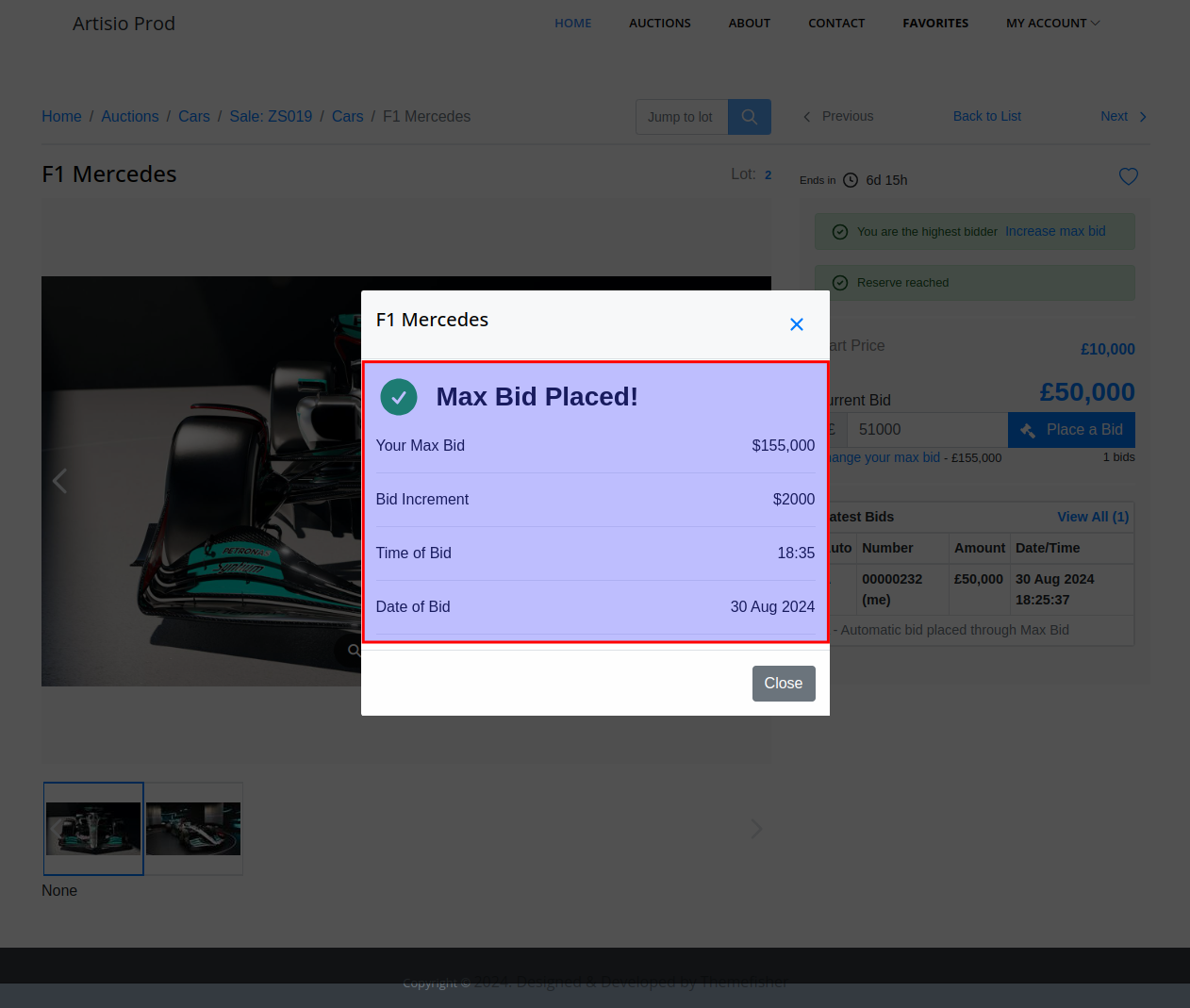
Default Template
<bid-placed-message />
<your-max-bid />
<bid-increment />
<bid-date />
Available Components
<BidPlacedMessage />
Message which is displayed when the bid is placed.
Component props
label
- Type:
string - Default: "Max Bid Placed!"
Usage
<bid-placed-message label="Your max Bid was accepted" />
<!-- or -->
<BidPlacedMessage label="Your max Bid was accepted" />
<YourMaxBid />
Displays the currently placed max bid amount with label "Your Commission Bid" or "Your Max Bid" in front of it.
<BidIncrement />
Displays Next Increment Amount with "Bid Increment" label in front of it
Component props
label
- Type:
string - Default: "Bid Increment"
Usage
<bid-increment label="Next Bid Increment" />
<!-- or -->
<BidIncrement label="Next Bid Increment" />
<BidDate />
Displays time and date of the max bid with labels: "Time of Bid" and "Date of Bid" in front of them.
Component props
show
- Type:
string - Default:
'both'
Provide which information you want to be displayed. Available Options: 'time', 'date', 'both'
Usage
<bid-date show="date"/>
<!-- or -->
<BidDate show="date"/>
Properties
mainConfig
See documentation here
increments
Array of increments, based on which next valid bid is calculated.
Example
[
  {"increment":  100, "up_to":  1000},
  {"increment":  200, "up_to":  10000}
]
lot
- Type:
object
Entire lot object. The object contains every single information associated to the lot. That can be used to render particular type of data that is not available as a ready component.
You can print the entire lot object into JSON format in the following way.
<pre>{{ lot }}</pre>
The result will be something like this
Click to expand lot object details
{
  "auction": "...",
  "auction_no": "ZS014",
  "auction_title": {
    "en": "ZS014",
    "fr": "ZS014"
  },
  "auction_uuid": "5f467b35-b433-48fa-98b7-f1266104a73f",
  "bp_tax_rate": "20.0000",
  "branch_phone": null,
  "buy_now_price": 500000,
  "category": {
    "dynamic_fields": {
      "description": {
        "field_class_name": "CharField",
        "label": "Description",
        "position": 2,
        "rules": {
          "allow_blank": false,
          "allow_null": false,
          "required": true
        },
        "type": "ckeditor"
      },
      "title": {
        "field_class_name": "CharField",
        "label": "Title",
        "position": 1,
        "rules": {
          "allow_blank": false,
          "allow_null": false,
          "required": true
        },
        "type": "ckeditor"
      }
    },
    "key": "ae92ebba-4779-453e-b087-8e836dbe9ea3",
    "name": {
      "en": "Sport Cars"
    }
  },
  "collection_info": {
    "address_1": null,
    "address_2": null,
    "city": null,
    "email": null,
    "municipality": null,
    "phone": null,
    "state": null,
    "zip_code": null
  },
  "currency": {
    "code": "GBP",
    "display": "British Pound",
    "symbol": "£"
  },
  "department": {
    "image": null,
    "key": "cars",
    "name": {
      "en": "Cars"
    }
  },
  "description": {
    "en": "<p>Bugati</p>Yes"
  },
  "dynamic_fields": {
    "en": {
      "description": "<p>Bugati</p>",
      "is_featured": true,
      "title": "<p>Bugati</p>"
    }
  },
  "end_date": "2023-12-02 06:02:00+00:00",
  "hammer_tax_rate": "20.0000",
  "has_my_bid": false,
  "high": null,
  "image_urls": [
    "http://localhost:4569/app.dev.artisio.co/media/001eacb6-ed5d-45d0-a783-210f647ece14/inventory/45fe1f41-69c0-41ef-be4b-5b27cb34258b/cf754343-ff05-4a93-bd1c-b68b6f57704f/0001_FqVXQw_sm.jpeg"
  ],
  "images": [
    {
      "lg": {
        "content_type": "image/jpeg",
        "extension": "jpeg",
        "height": 1080,
        "mime": "image/jpeg",
        "size": 169455,
        "uploaded": true,
        "url": "http://localhost:4569/app.dev.artisio.co/media/001eacb6-ed5d-45d0-a783-210f647ece14/inventory/45fe1f41-69c0-41ef-be4b-5b27cb34258b/cf754343-ff05-4a93-bd1c-b68b6f57704f/0001_FqVXQw_lg.jpeg",
        "width": 1920
      },
      "original": {
        "content_type": "image/jpeg",
        "extension": "jpeg",
        "height": 2000,
        "mime": "image/jpeg",
        "size": 2168703,
        "uploaded": true,
        "url": "http://localhost:4569/app.dev.artisio.co/media/001eacb6-ed5d-45d0-a783-210f647ece14/inventory/45fe1f41-69c0-41ef-be4b-5b27cb34258b/cf754343-ff05-4a93-bd1c-b68b6f57704f/0001_FqVXQw_original.jpeg",
        "width": 3556
      },
      "sm": {
        "content_type": "image/jpeg",
        "extension": "jpeg",
        "height": 400,
        "mime": "image/jpeg",
        "size": 29331,
        "uploaded": true,
        "url": "http://localhost:4569/app.dev.artisio.co/media/001eacb6-ed5d-45d0-a783-210f647ece14/inventory/45fe1f41-69c0-41ef-be4b-5b27cb34258b/cf754343-ff05-4a93-bd1c-b68b6f57704f/0001_FqVXQw_sm.jpeg",
        "width": 600
      },
      "thumb": {
        "content_type": "image/jpeg",
        "extension": "jpeg",
        "height": 100,
        "mime": "image/jpeg",
        "size": 1784,
        "uploaded": true,
        "url": "http://localhost:4569/app.dev.artisio.co/media/001eacb6-ed5d-45d0-a783-210f647ece14/inventory/45fe1f41-69c0-41ef-be4b-5b27cb34258b/cf754343-ff05-4a93-bd1c-b68b6f57704f/0001_FqVXQw_thumb.jpeg",
        "width": 100
      }
    }
  ],
  "increments": null,
  "is_dynamic": true,
  "is_favored": false,
  "is_nft": false,
  "is_private_treaty": false,
  "is_started": true,
  "is_vat_applicable_for_hammer_price": true,
  "last_bid_amount": null,
  "lot_no": "1",
  "low": null,
  "max_bid": null,
  "max_bid_status": null,
  "next": "a7ade8d6-15ed-4c11-a867-6a9f9a6fd722",
  "nft_data": null,
  "num_of_bids": 0,
  "previous": null,
  "quantity": 1,
  "reserve": null,
  "short_description": {
    "en": "<p>Bugati</p>"
  },
  "start_date": "Fri, 24 Nov 2023 15:39:00 GMT",
  "start_price": 20000,
  "status": "published",
  "stock_no": "BT1/4",
  "subscriptions": [],
  "tax_rate": "20.00",
  "third_party_url": null,
  "title": {
    "en": "<p>Bugati</p>"
  },
  "uuid": "5b56a3a8-6097-4eb2-9157-8405ec7edb21",
  "watchlist_count": 0,
  "winning_bid": null,
  "actual_start_date": "2023-11-24T15:39:00.000Z",
  "actual_end_date": "2023-12-02T06:02:00.000Z",
  "last_bids": [],
  "hasBids": false,
  "last_update_date": 1701079624786
}
Rendering content from lot object
You can output any of the lot fields in the following way.
<!-- Outputs lot's buy now price -->
{{ lot.buy_now_price }}

<!-- Outputs lot tax rate -->
{{ lot.tax_rate }}
There are a couple of fields on lot object which are translatable.
Example: short_description, title, description, etc.
These properties might contain value for multiple languages.
To display content for the current language you need to use filter currentLocale.
You can see how Vue.js filters can be used.
{{ lot.title | currentLocale }}
But if the content contains HTML tags the content will be displayed with tags.
<p>This is lot's description</p>
To render HTML tags properly you need to render translatable content in the following way.
<div v-html="$options.filters.currentLocale(lot.description)"></div>
The content will be rendered as expected inside <p> tag.
This is lot's description
Check if the customer is registered as bidder on the auction
<div v-if="lot.auction.is_bidder">
  The customer is registered as bidder on the auction
</div>
If bidder auto approval is not enabled on the auction, bidder might be registered, but its status might not be approved. You can check this inside lot.auction.is_approved_bidder flag.
<div v-if="lot.auction.is_approved_bidder">
  The customer is registered as bidder on the auction and is approved
</div>
Example 1
Check if the user is authenticated or not, check the bidder status as well and display bidding button, max bid button and buy now buttons only after that.
<div v-if="!is_authorized">
  Please login on the website to place a bid
</div>
<div v-else>
  <div v-if="!lot.auction.is_bidder">
    Please register on the auction to place a bid
  </div>
  <div v-else-if="!lot.auction.is_approved_bidder">
    Your bidder status is not approved, You can't place bids until you get approved.
    <div v-if="lot.auction.require_credit_card_verification">
      Please finish your credit card verification to be able to bid on the auction.
    </div>
    <div v-else-if="lot.auction.initial_deposit_amount">
      This auction requires initial deposit. Please pay your deposit invoice to be able to bid on the auction
    </div>
  </div>
  <div v-else>
    <bidding-input/>
    <bidding-max-bid/>
    <bidding-buy-now-button/>
  </div>
</div>